 LevelZMOD
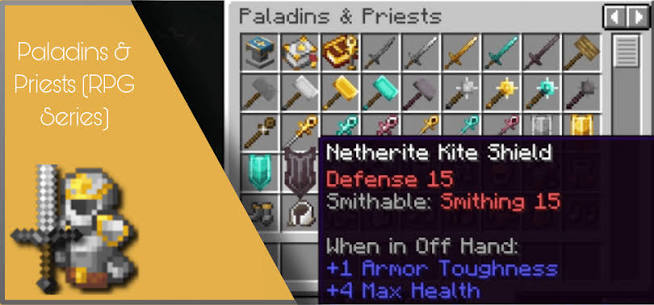
A powerful modded shield is not necessarily usable the moment you find it. When your pack applies LevelZ restrictions, a tooltip can list several requirements, and each may refer to a different action. This guide explains how to read those rules and decide whether an upgrade is worth pursuing.
The supplied picture shows a shield with defense and smithing labels. Treat those values as an example from the pictured environment. They do not establish the default requirements for every LevelZ release or every shield mod.
Check whether an integration actually exists
Some equipment needs an addon or custom datapack to participate in a progression system. There is a published Level Z - Paladins and Priests addon, but an addon page is not proof that every release combination is supported.
Match the Minecraft version, loader, base mods and addon file before testing. A content mod loading successfully does not necessarily mean its equipment has been assigned sensible skill restrictions.
Separate the actions you are trying to perform
Obtaining, crafting and using are different checks
Finding an item in a chest answers whether you can obtain it. Crafting answers whether a recipe is available. Equipping or activating it answers whether its use is allowed. One check can pass while another fails.
A tooltip that distinguishes a use requirement from a smithing requirement should be read in that context. Investing in a crafting-related skill may not make the finished item usable, and a usable item does not automatically unlock its upgrade recipe.
Make a small upgrade worksheet
| Question | What to record |
|---|---|
| Which item do I want? | Exact item name and, if available, registry identifier |
| What action is blocked? | Crafting, upgrading, equipping or using |
| What requirements are displayed? | Every listed skill and level |
| What do I already have? | Current skill values, materials and usable alternatives |
| Is the integration present? | Matching addon or pack rule, rather than a guess |
Do this before spending points. The worksheet prevents chasing one requirement while overlooking another.
Plan upgrades around usefulness
Compare the desired item's practical benefit with the amount of progression still required. Consider durability, repair access, the activity you are preparing for, and whether the upgrade depends on another locked component.
For instance, imagine that a pack requires two different skills for a shield. If you can satisfy one requirement now but need a long investment for the other, a currently usable shield may be the better immediate choice. This example explains planning; it does not prescribe a universal build.
Keep the old item until the replacement has been tested in the correct slot and situation. Tooltips can describe requirements, but a controlled test confirms that the intended action works.
Troubleshoot an unexpected restriction
First check the exact item variant. Similar names can belong to separate registry identifiers with different rules. Next confirm that your addon and server configuration match the pack you are playing.
If a restriction affects every item from the same mod, review the integration files. If only one item behaves unexpectedly, inspect its identifier and the rule targeting it. Make one change at a time in a test world rather than removing an entire restriction system.
Server administrators should test with an ordinary player account or permission level. An administrator's elevated permissions can make a progression check appear to pass when normal players remain blocked.
Common equipment questions
Does the screenshot prove that the addon is installed?
No. A picture illustrates another setup. Your mod list and active datapacks are the evidence for yours.
Can a custom pack change the requirements?
Pack authors can define progression rules. If the values differ from a video, ask which rules your server actually uses.
Where should I go if several items need custom rules?
Use the datapack troubleshooting guide to identify the action and target before editing anything.